Getting Started
This page explains how to set up the development environment.
Prerequisites
Install a new version of Node. The runtime.
Visual Studio Code. The Editor.
https://code.visualstudio.com/
Git. The version control system.
Get the Code
Go to the Repository on GitHub:
https://github.com/ever-mira/trippy-social
Clone
Open the link, click the green button, and copy the url that is displayed to you. 
Go to a folder on your computer, where you want the code to be stored.
Open the console, and type "git clone", and append the url:
$ git clone https://github.com/ever-mira/trippy-social.gitNow you have the code of the project stored on your computer.

Run the project
Open the folder in Visual Studio Code.
In the top menu, press Terminal -> New Terminal: 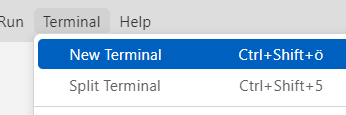
Execute the command "pnpm install", to install the dependencies:
$ pnpm installRun the project
To run the project, execute the command "pnpm run dev".
$ pnpm run devWait until the build ist finished. Click the link that is displayed to you. It will open the app in your browser:

You should now see Trippy Social running locally on your computer.
Changes you make to the code, are instantly reflected in the browser.
Environment Variables
For the application to be able to make a connection to the database, some environment variables have to be set.
-> see ".env.example" file in the root of the project.
Please ask in the Telegram group, or ask Mira, to get some help :)
Next
To learn about the technologies, and how the code is structured, read the next chapter.